
What this article covers
Most record-linking problems come from one of three causes: a required record does not exist yet, a key was entered differently across templates, or one row is trying to carry more than one valid value.
This page helps you check the dependency order and the main relational links in the register. The register relies on consistent contractual arrangement reference numbers, provider identifiers, function identifiers, and ICT service types across the linked templates.
Issues covered on this page
Related
I am not sure which record to create first
What this usually means
You need a clean order for building linked records. The safest approach is to create the shared parent records first, then the contractual arrangement, and only after that add the rows that depend on that arrangement.
What to check and how to fix it
Check whether you already know the direct ICT third-party service provider.
If you do, create that provider record first, because later records need one consistent provider identifier.
Check whether the service supports a specific function of the financial entity.
If it does, create the function record next, because later contract rows need the function identifier.
Check whether the direct contract is ready to record.
If it is, create the contractual arrangement record after the provider and function records, and assign its contractual arrangement reference number.
Check whether you need to show which entity uses the ICT service.
If you do, add that link after the contractual arrangement exists, so the user-entity row can point back to the right arrangement.
Check whether the arrangement has subcontractors or a wider ICT service supply chain.
If it does, add those rows after the direct provider and contractual arrangement are in place, using the same contractual arrangement reference number and the correct rank order.
Check whether the arrangement is intra-group.
If it is, record the relevant contractual arrangements first and then add the intra-group link between them before extending the supply chain.
Check whether one row is trying to hold more than one valid value.
If it is, split it into separate rows rather than trying to build several links at once.
Related issues
I cannot assign a function to this contract
What this usually means
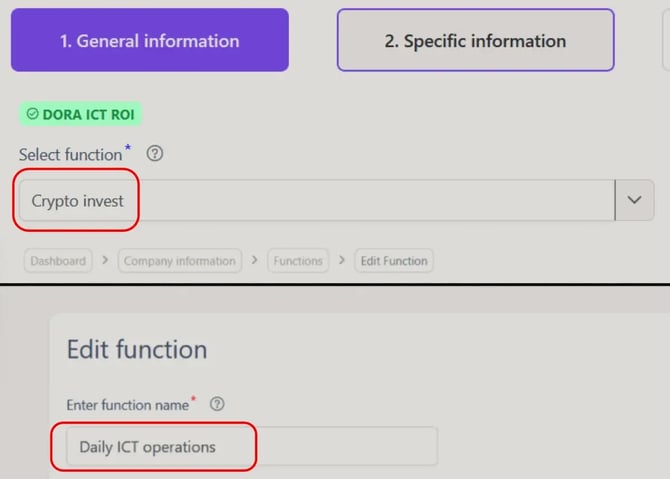
The contract is ready, but the function link is not. Usually that means the function record does not exist yet, or the contract is using a function identifier that does not match the function record you created.
What to check and how to fix it
Check whether the relevant function already has its own function record.
If it does not, create the function record first before trying to link it to the contract.
Check whether the function identifier on the contract matches the function identifier in the function record exactly.
If it does not, use the existing function identifier from that function record.
Check whether the function record belongs to the right financial entity.
If it was created under the wrong entity, create or use the function record for the correct entity before linking the contract.
Check whether the same function has been split across duplicate function records.
If it has, use one consistent function record so the contract points to a single function identifier.
Check whether the row is trying to capture more than one function.
If more than one function applies, add separate rows instead of trying to assign several functions in one row.
I cannot link this contract to the correct arrangement
What this usually means
The contract exists, but it is pointing to the wrong arrangement record or using the wrong contractual arrangement reference number. In some cases, the issue is that related arrangements have not been recorded in the right structure first.
What to check and how to fix it
Check whether the contract already has one unique contractual arrangement reference number.
If it does not, create or confirm that reference first and use the same value everywhere that arrangement is linked.
Check whether the contract is linked to the arrangement that was signed directly with the relevant provider.
If it is pointing to a different document or related arrangement, relink it to the correct direct arrangement.
Check whether you are treating an associated or subsequent arrangement as if it were the main arrangement.
If that is wrong, record the main contractual arrangement correctly and then link the related arrangement in the right structure.
Check whether the same contractual arrangement reference number is used consistently across the linked templates.
If another row uses a different value for the same arrangement, correct it before moving on.
Check whether the issue is actually an intra-group arrangement link.
If it is, record both relevant contractual arrangements first and then connect them through the intra-group linking template.
Check whether one row is trying to cover more than one valid arrangement value.
If it is, split it into separate rows instead of forcing several arrangement links into one row.
I cannot link this subcontractor
What this usually means
The subcontractor record is there, but it is not connected to the right provider in the ICT service supply chain. Usually the problem is a missing provider record, the wrong provider identifier, or a chain row that does not reflect the right rank and provider relationship.
What to check and how to fix it
Check whether the subcontractor already exists in the provider records.
If it does not, create that provider record first before trying to link it in the supply chain.
Check whether you are linking the subcontractor to the provider that actually sits directly above it in the chain.
If you linked it to the wrong provider, update the row so it points to the correct provider relationship.
Check whether the subcontractor is using the same contractual arrangement reference number as the rest of that chain.
If the reference is wrong, move it to the correct arrangement before checking anything else.
Check whether the ICT service type matches the chain you are adding it to.
If the service type is different, correct it or create a separate row for the correct service.
Check the rank.
If the row is for a subcontractor, the rank should be higher than 1. If the rank is wrong, correct it so the chain shows the subcontractor at the right level.
This arrangement is not linking correctly
What this usually means
The arrangement exists, but the supply-chain rows do not describe one consistent chain. Usually the contractual arrangement reference number, ICT service type, rank, or linked provider is not aligned across the rows that should belong together.
What to check and how to fix it
Check whether every row in that chain uses the same contractual arrangement reference number.
If one row uses a different reference, correct it so all rows point to the same arrangement.
Check whether the ICT service type is consistent across the arrangement and the linked supply-chain rows.
If it is not, correct the mismatch or split the records into separate chains where different services are involved.
Check whether the direct ICT third-party service provider is recorded at rank 1.
If it is not, reset that row first, because the rest of the chain depends on that starting point.
Check whether each subcontractor has a rank higher than 1 and sits at the right level in the chain.
If the rank is wrong, correct it before checking the next link.
Check whether each subcontractor row points to the provider directly above it in the chain.
If it points to the wrong provider, relink it to the correct upstream provider.
Check whether one row is trying to describe more than one valid provider relationship.
If it is, split it into separate rows so each row represents one link in the chain.
I changed a reference and other rows stopped linking
What this usually means
You changed a shared key in one place, but not in every row that depends on it. In the register, links rely on consistent contractual arrangement reference numbers, provider identifiers, function identifiers, and ICT service types across related templates.
What to check and how to fix it
Check which reference you changed.
If it was a contractual arrangement reference number, provider identifier, function identifier, or ICT service type, treat it as a shared key that may be reused in other linked rows.
Check where that same key is used across the register.
If only one row was updated, either restore the original value or update every dependent row that should still point to the same record.
Check whether the changed reference was meant to identify a new record instead of renaming an existing one.
If it was, create a separate new record and keep the original key for the original linked record.
Check whether the same key is now being used for two different records.
If it is, separate them so each contract, provider, function, or service link has its own consistent identifier.
Check the linked templates again after the correction.
If the same record is described in more than one template, the shared key needs to match exactly in each place.
Check whether one row is trying to carry more than one valid value after the change.
If it is, split it into separate rows instead of forcing several meanings into one key.
Related issues
My keys do not match across templates
What this usually means
The same contract, provider, function, or ICT service is being described with different key values in different templates. That breaks the link between related rows, even where the underlying record is meant to be the same.
What to check and how to fix it
Check the contractual arrangement reference number across every template that refers to that contract.
If the same arrangement has different reference numbers, replace them with one consistent value.
Check the provider identifier used across the provider and contract-related templates.
If the provider is recorded with different identifiers, keep one correct identifier and update the linked rows to match it.
Check the function identifier wherever the contract is linked to a function.
If the function identifier differs between the function record and the contract-linked row, use the exact function identifier from the function record.
Check the ICT service type across the rows that are meant to describe the same service link or supply chain.
If the service type differs, correct it so the linked rows describe the same ICT service.
Check whether the mismatch comes from trying to use one key for more than one valid value.
If it does, split the data into separate rows instead of forcing different contracts, providers, functions, or services into one shared key.
Check the linked templates again after each correction.
If the rows are meant to refer to the same record, the key values need to match exactly in each place.